
Summary
Lead our newly-formed team in a year-long initiative to build stakeholder buy-in, audit accessibility issues, significantly improve required WCAG compliance across Southern Glazer’s public website. Responsibilities included:
Accessibility strategy
UX design
Accessibility audit
Stakeholder presentations
Cross-functional collaboration
Design QA
WCAG research
Details
Timeframe Q1 2025 - Q1 2026
Tools Figma, Lighthouse, DevTools
Role Digital Product Designer
Teams engaged Digital Product Design, Development, Internal Communications
The Opportunity
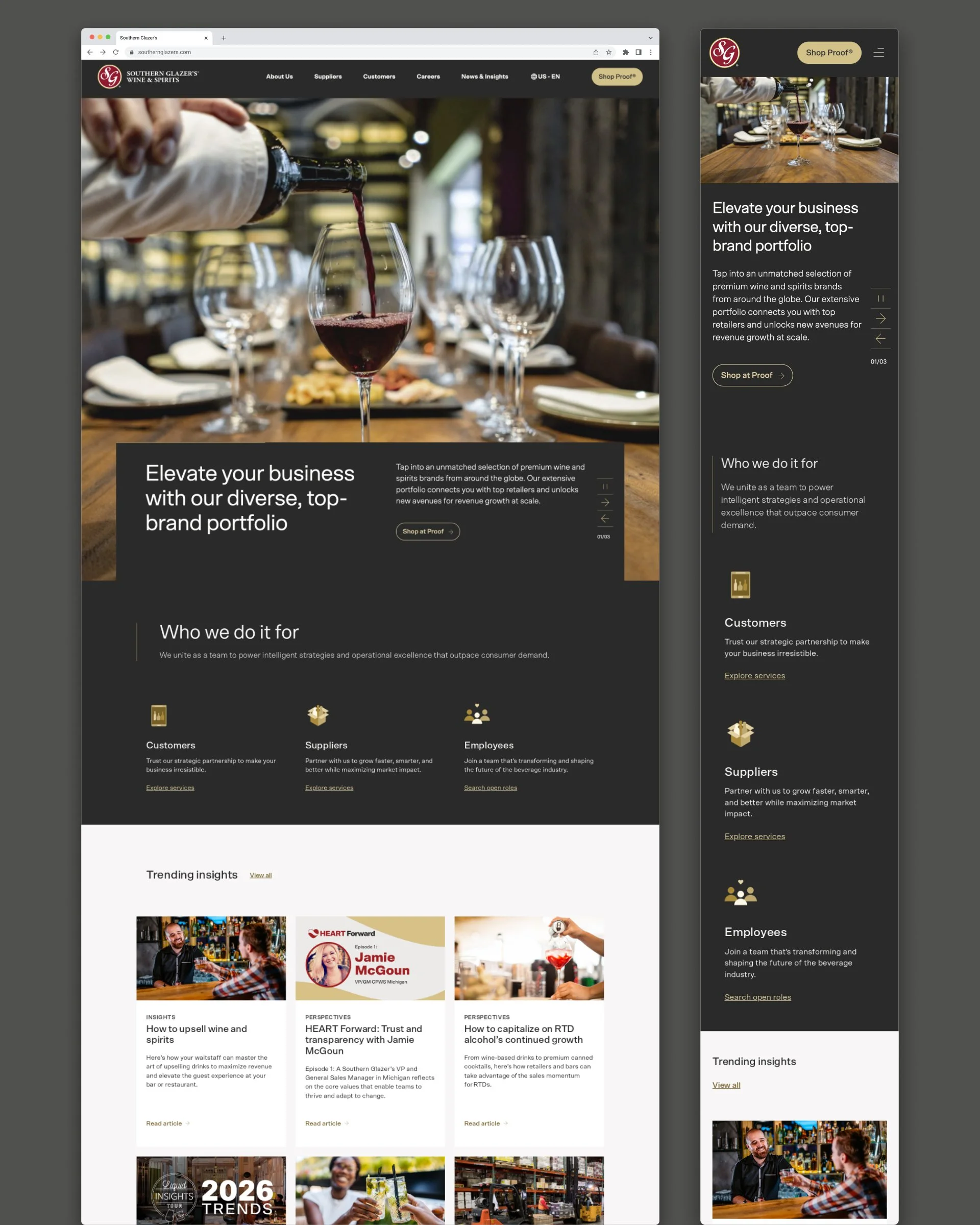
I joined Southern Glazer’s Digital Product team in February 2025 as the first member of a brand-new sub-team focused solely on the corporate website. While auditing the site for familiarity, I first noticed a low contrast between the site buttons and background colors.
This prompted me to explore other ADA compliance concerns on the website. Clearly, the website had not been held to required ADA standards, nor had it been considered a business priority. This could be a significant problem for my company.
Building the Business Case
With the support of my team lead, I was encouraged to build a case for leadership. It wasn’t just that the website was inaccessible to significant groups of people - we were at a serious risk of litigation for failing to copmly with the American with Disabilities Act as it pertains to websites. My presentation included how Target was fined $6.6 million for not including alt-text on its website in 2006. As the largest distributor of beverages in North America, Southern Glazer’s was too big not to act swiftly.
The presentation to leadership additionally demonstrated potential loss of business for SG from clients with vision, motor-skills, or hearing challenges. Weaving in inclusive design into the front door for our company would signal our intentional efforts to accommodate client needs at all levels. While hard numbers were not available, the stakeholders found it compelling.
Becoming the Accessibility Lead
Since no one was an accessibility specialist and there was no budget for a consultant, I researched the WCAG 2.2 standards. I became the go-to internal resource for our company’s corporate website.
As with any project heading down an unknown path, we had to determine what was essential, optional, budgetable, and doable. There was significant give and take as well as constant shifting of priorities to bring in the results we needed the most. Project documentation of our work was managed by my supervisor.
Auditing the Website
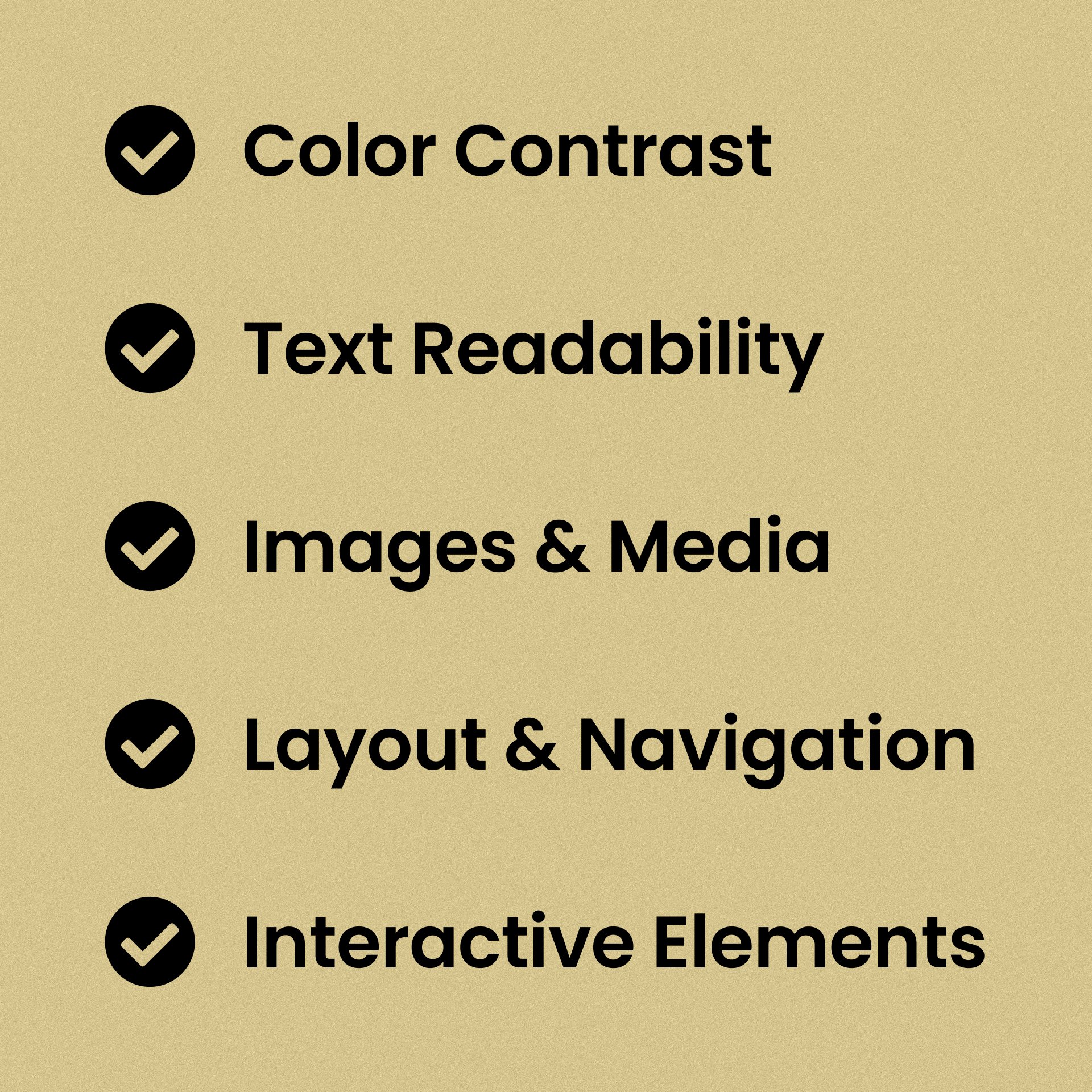
I broke up the audit of the 150-page site into 5 categories: color contrast, text readability, images & media, layout & navigation, and interactive elements.
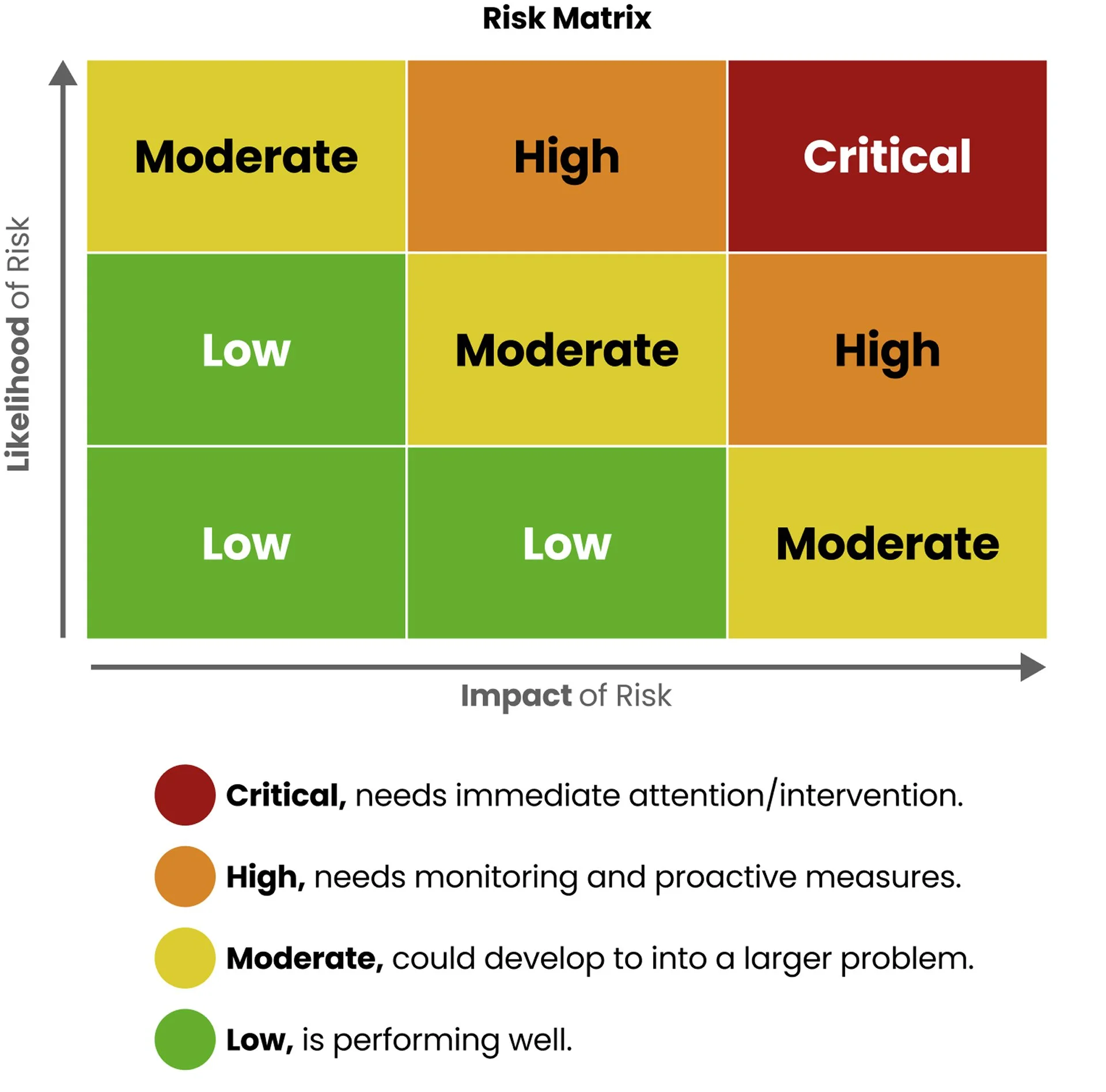
With the categories defined, I combed through each page by subject, using plugins like Lighthouse and Stark to surface issues. In addition, I applied a risk-matrix code to each issue for prioritization.
From Audit to Action
Three core needs surfaced almost immediately: Improving readability, making interactions accessible, and supporting assistive technologies. My research confirmed these were our top compliance risks, so we focused on remediation.
Improving readability
Color contrast was a critical issue, with some links failing compliance. To ensure each person had a reasonable opportunity to read our text, I documented every instance of color contrast on the site by application, and surfaced the ones below AA compliance.
We made sure the site’s typeface, SCTO Grotesk, had a series of more widely-available fall-back sans serifs, in case assistive technologies did not support SCTO.
The team worked on heading stylings vs taggings, so while headings could be styled like an H5, they were tagged appropriately, cascading from H1 through H3 for ease of navigation.
Making interactions accessible
Keyboard navigation proved difficult initially because the top navigation relied on hover to reveal submenu items, but only the top item was clickable. Therefore, relying on keyboard navigation alone, users were not able to browse submenu options at all. A full redesign of the top-nav interactions was approved and implemented.
The call for applying branded focus-states to our site was considered. Ultimately, we decided to rely on browser defaults for ease and confirmed compliance.
Button colors were updated across the board so that both the default and hover states passed AA graphics compliance AND that text was AAA compliant.
Supporting assistive technologies
Partnering with our team’s copywriter to develop alt-text on every non-decorative image, improved access for any clients needing to use this option.
ARIA-labels, while necessary, are a headache. I worked closely with the developers to apply ARIA-labels to the code for specified components (accordion lists and dropdowns, for example).
Closed captions were added as an optional functionality for every video posted to the site. The team copywriter devoted significant time developing accurate transcripts to each video for the dev team apply in the backend. Moving forward, transcripts are a mandatory part of uploading videos to the site.
Working Across Teams
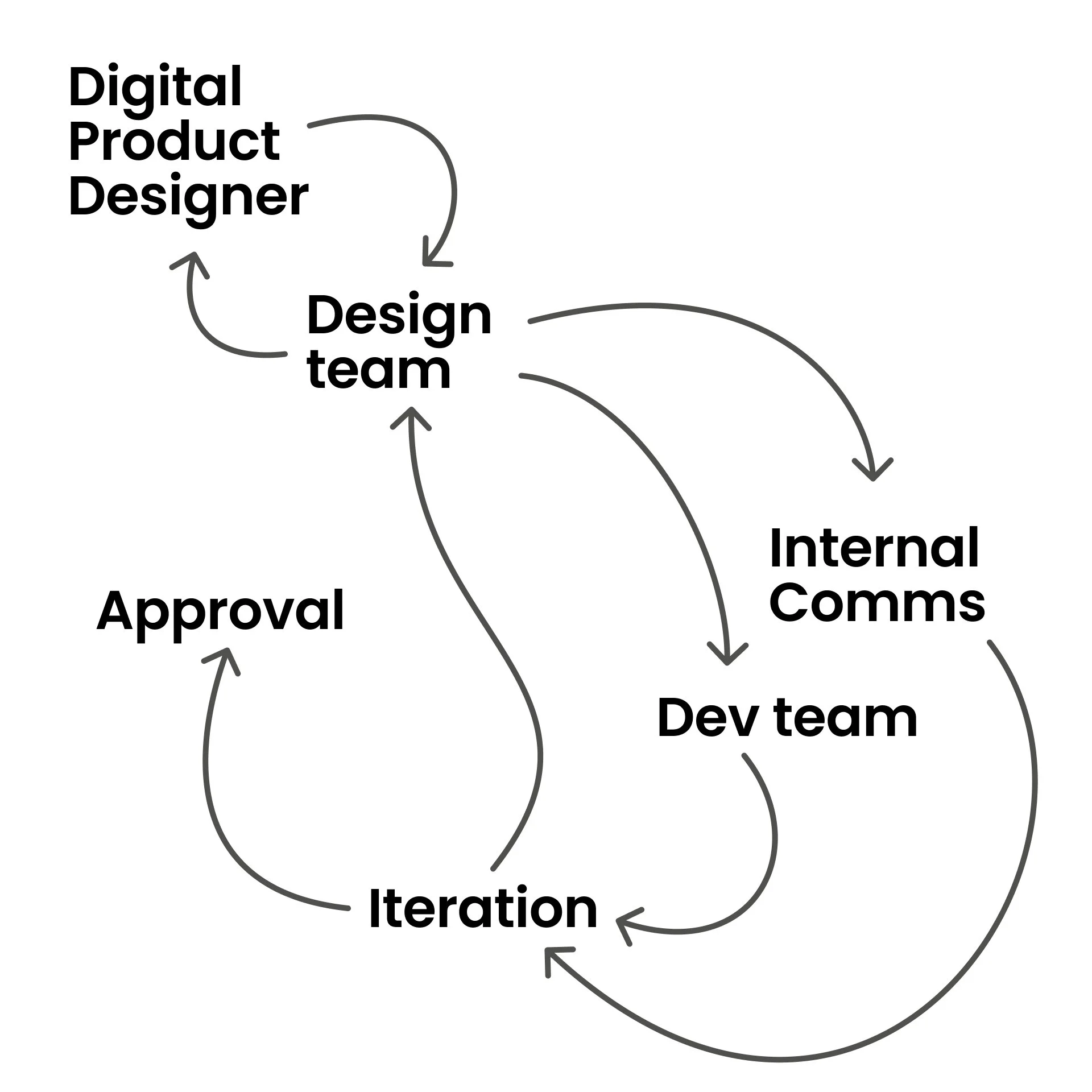
There were frequent reviews across three teams before a final decision was made. As the Digital Product Designer, I’d share my initial solutioning with my sub-team for approval before sharing with the website owner from Internal Comms and Project Manager from the Dev team. After several rounds of iterating, I’d receive all team approvals to move on to a solution.
A balance between user needs, business desires, authoring requirements, and backend capabilities drove multiple rounds of iterations to a final decision. Most work was a journey with a surprise solution.
Working Across Teams
Often, every resolved problem uncovered several more.
Between working within the CMS platform, Adobe Experience Manager, complex fixes for easy problems, and introducing new standards into our legacy code, our development team constantly battled tech debt.
In addition, we struggled with scope creep. A simple button color change set off the need to recode and connect all 42 similar button applications so that in the future, the development team could update them only once.
Prioritization became an issue, but my leader allowed me to lay out problems and suggested solutions for her. Partnering closely with the Internal Comms and Development teams provided direction and clarity for next steps as well.
Impact
150 corporate site pages reviewed
~100 accessibility tickets addressed
42 components updated
85% WCAG compliance achieved
1 new accessibility-first workflow
Additionally:
improved Lighthouse scores
accessibility guardrails for authors
accessibility integrated into design discussions
Reflection
Throughout this entire process, I learned accessibility isn’t about meeting a requirement; it’s about maximizing the experience for as many people as possible. If we are willing to meet the needs of otherwise marginalized groups of people, we not only expand our reach, but establish ourselves as as trustworthy company with a quality service.
I learned it’s okay to say "I don’t know, yet” - I said it often during meetings when colleagues had questions I hadn’t considered! It’s unnerving to be looked at as the expert in the room and not know what the best next steps are off the top of my head. But, I’ve found people don’t just appreciate you double-checking your work, but a little authenticity goes a long way.
And finally, I’m proud to say whenever discussing new work for the website, my team (and folks on other teams) are quick to ask about a potential solution: “but is it accessible?”
Key Takeaways
Identified and championed an accessibility initiative that was not previously prioritized.
Secured stakeholder buy-in through research and presentations focused on business value and legal risk.
Led a comprehensive accessibility audit of a 150-page enterprise website using WCAG 2.2 standards.
Collaborated across Design, Development, and Internal Communications to prioritize and implement improvements.
Helped establish accessibility as a standard consideration in the team's design and development process.